Guides
Manage your Instagram comment section: replies, DMs and tracking
Sort Instagram comments by intent, send requested resources through Sayw, and track delivery and follow-ups without treating every comment as a sales lead.
Read the request before choosing the reply
A Reel can collect “guide,” “how much?” and “my order has not arrived” under the same post. Those IG comments need different responses. Send the promised resource to the first person, answer the price question with context, and move the order problem into a private conversation.
Our recommendation is to automate a clear request for a specific resource first. Keep open-ended questions and complaints in a human review queue until you have a reliable way to handle them. A broad reply to every Instagram post comment can look active while leaving the actual question unanswered.
Start in the Instagram comment section and classify what people want. The table is an illustrative working method, not a claim that Sayw automatically applies these categories to every comment.
| Example comment | Intent | Next action |
|---|---|---|
| “Guide” | Get the resource promised in the post | Send the matching DM flow. |
| “Is this suitable for beginners?” | Understand the offer | Answer publicly if no personal details are needed. |
| “Can I book Saturday?” | Discuss availability | Continue privately and collect the missing details. |
| “My order has not arrived” | Resolve a problem | Acknowledge it and request order details privately. |
| Abusive or repetitive spam | Moderation | Use Instagram’s moderation controls. |
Make the comment instruction easy to follow
Choose a short keyword that people can type comfortably on a phone. “Comment GUIDE for the flower-care checklist” tells readers what to write and what they will receive. The caption, public reply and first DM should describe the same resource.
Avoid using a common conversational word as a catch-all trigger. If “yes” appears naturally in discussion, a resource flow may interrupt people who were answering somebody else. Give different offers distinct keywords, and review any older automation that might match the same request.
Before publishing, open the resource link without your owner login. A private document or an expired download turns a successful message into an unsuccessful experience. If you ask someone to follow before receiving the resource, make that step clear in the offer rather than surprising them after the comment.
Preview the public reply and the DM in Sayw
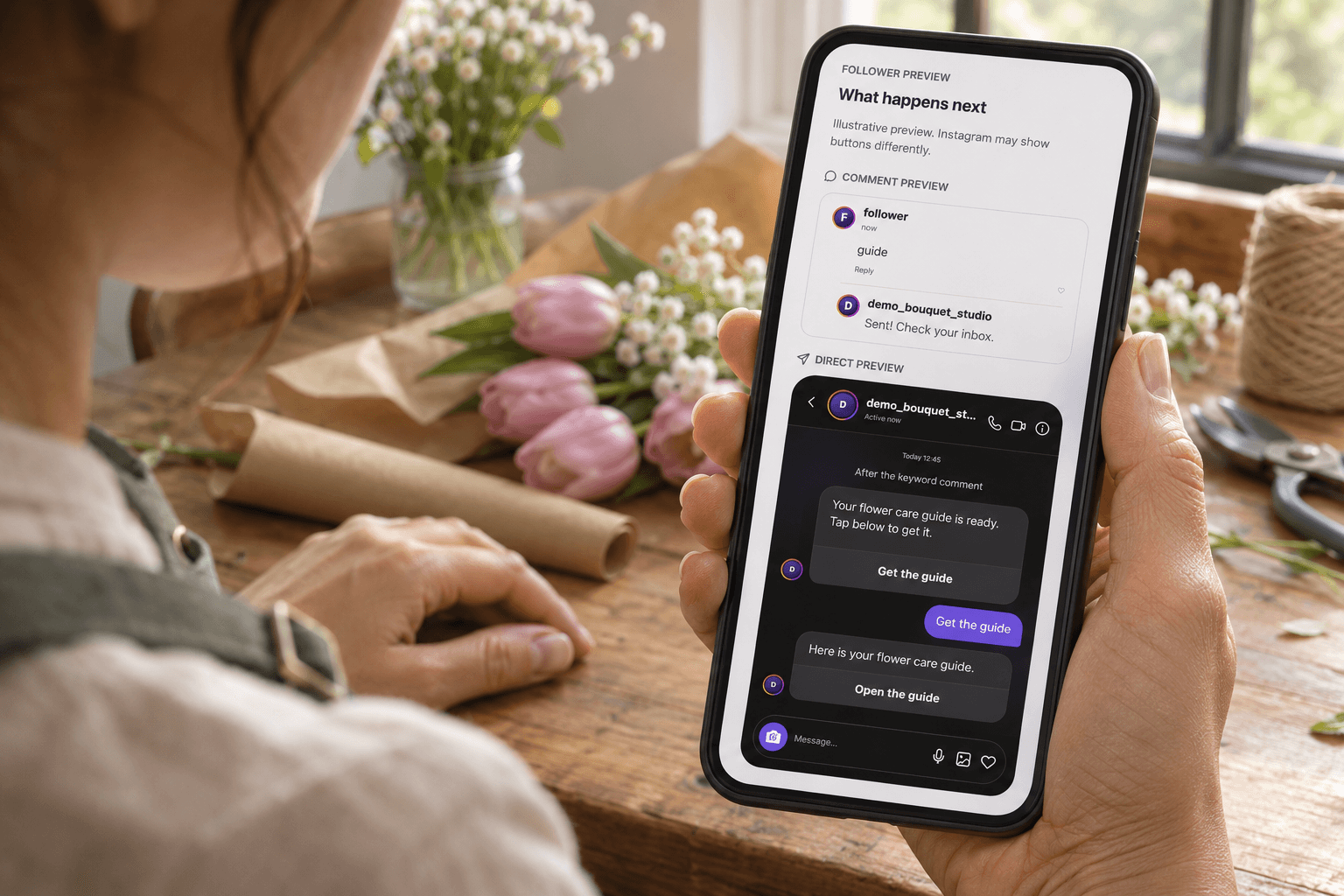
Connect your professional Instagram account to Sayw and create the automation for your resource. Set the keyword, public reply, first private message and resource text or link. Use the follower preview to read the sequence from the recipient’s perspective.
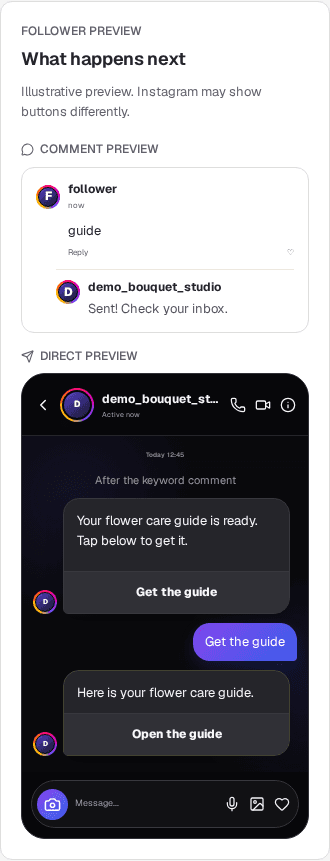
In the example below, the public reply says the guide was sent, the first DM offers a button, and the resource follows that interaction. Preview labels describe the intended sequence; the preview itself does not send messages. Instagram may display buttons differently from the illustration.
Keep the first message short enough to explain the next action. “Your flower-care guide is ready. Tap below to get it” is clearer than a long introduction before the button. Use a button label that names the result, such as “Get the guide,” so readers know what the tap does.
When you finish configuring the flow, save it and check its enabled state. A saved draft cannot handle new comments while it is paused. If another tool is also connected, review its matching rules before testing to avoid two providers answering the same person.
Test the full path with another account
Use another consenting Instagram account to leave the keyword on an eligible post. Check the public response, open the DM, press the button and open the delivered link. A good preview and a saved automation are preparation; this test checks what a recipient actually receives.
If the first message is missing, check message requests as well as the main inbox. If a follow check is enabled, test that branch too. Stop at the first step that fails and inspect its result before repeating the whole flow.
Review the matching keyword, enabled state and account connection in Sayw when nothing triggers. If a message was sent but the guide will not open, inspect the destination link. Reconnecting an account is not a universal fix for every delivery or resource problem.
| What you observe | What to check next |
|---|---|
| No automation activity | Keyword, eligible trigger, enabled state and connection. |
| Public reply but no visible DM | Message requests and the private-message result. |
| First DM arrives; resource does not | Button interaction and any configured follow step. |
| Resource arrives; link fails | Destination access, redirects and the actual file. |
| Two similar replies | Overlapping rules in Sayw or another connected provider. |
What an Instagram comment tracker should tell you
For a resource campaign, the useful question is whether a matching request reached the next step. Review the activity and delivery information Sayw provides for its automations, then open the conversation when someone needs help. That is different from maintaining an archive of every comment ever left on Instagram.
Do not read an event count as a customer count. One person may produce several events, and public replies and private messages describe different actions. A sent message also does not prove that the recipient opened the resource, booked an appointment or paid.
For follow-ups that need a person, keep a short working list: contact, original post or request, latest response, next action and responsible teammate. Use the conversation and CRM record where available. Write a concrete next action such as “Confirm Saturday pickup,” rather than “Follow up.” That lets somebody else continue without rereading the entire exchange.
Compare the same period and the same definitions when reviewing a campaign. If you want to measure bookings, use confirmed booking records. Message delivery can help diagnose the path to that outcome, but it is not a substitute for the outcome itself.
Keep moderation in the review routine
Instagram provides controls such as Hidden Words and Limits to help manage unwanted comments and message requests. Meta’s explanation describes filtering offensive language and limiting some interactions during a surge of attention. Review the controls available in your Instagram account when spam or abuse rises.
Use those settings for moderation and Sayw for the supported response workflow. Also check whether legitimate requests are being hidden by your settings before assuming an automation is broken. Keep order numbers, email addresses and other personal details out of the public thread.
For a daily check, look for unresolved questions, failed deliveries and conversations waiting for a personal answer. Improve the caption or resource when the same confusion keeps appearing. More automated replies will not fix an unclear offer.
Questions about tracking Instagram comments
Can Sayw show every comment on any Instagram account?
This guide covers automations and conversations for your connected account. It does not describe a universal comment scraper or access to other people’s private accounts.
Should every comment receive the same automated reply?
Use a defined resource request for a predictable flow. Questions, complaints and sensitive details often need a different response, so review the intent before extending automation.
Why do replies and events have different totals?
They measure different actions. A single person can trigger several events, and a reply is not necessarily a unique lead. Check the definition and period before comparing totals.
What should I check before launching another post?
Test the keyword, public reply, DM button and resource link with another account. Confirm the automation is enabled and that an older rule will not send a second response.