Tools
Build a service quote calculator with Claude Design
Give Claude explicit prices, check the arithmetic and test a calculator before sharing it. Includes a fictional video-package example and input checks.
Write the price rules before the prompt
A potential client wants two short videos, three photos and a faster turnaround. A calculator can show how those choices affect your estimate, but only if the pricing rules are clear. Claude Design can help you prototype the interface; you still need to decide which work the price covers.
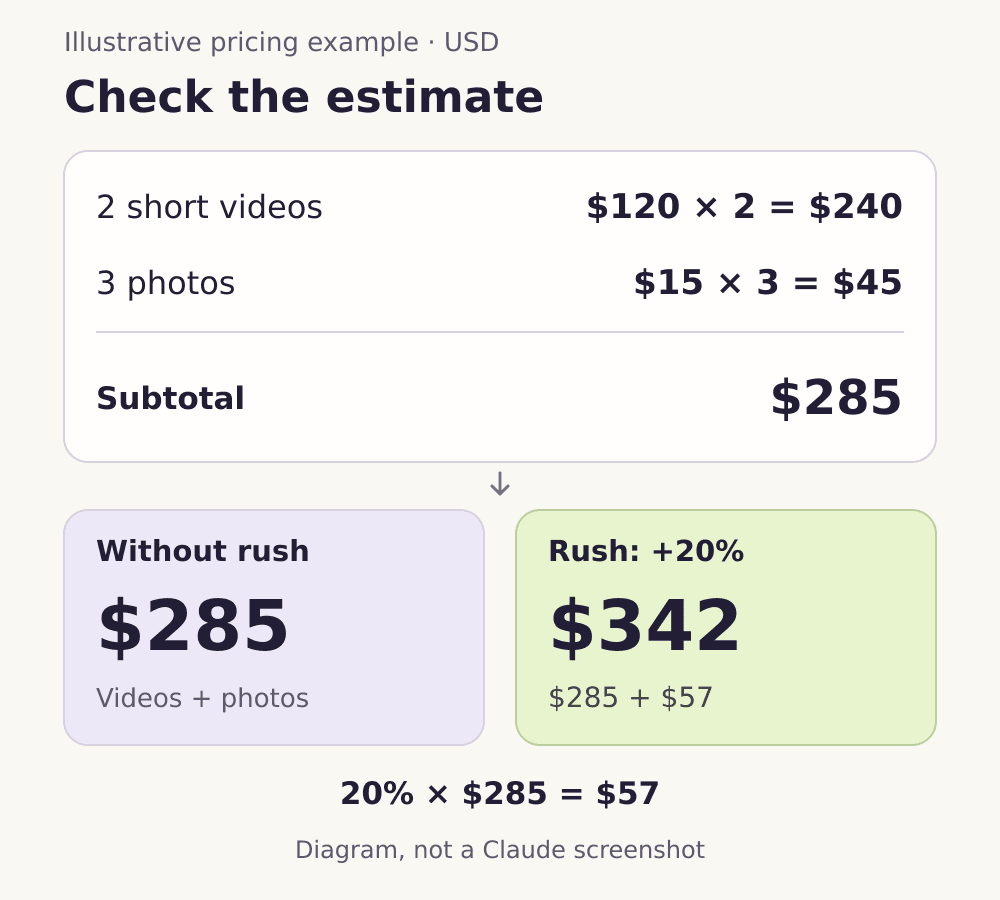
For this exercise, use invented prices in US dollars: each short video costs $120, each photo costs $15, and rush delivery adds 20% to the combined subtotal. Allow one to five videos and zero to ten photos, in whole numbers. Usage rights, travel and taxes need separate agreement. These are example rules, not suggested market rates or a report of a creator’s results.
We recommend starting with a package whose price follows a simple formula. If every project needs a different licensing agreement, show a preliminary estimate and ask the client to discuss the brief before treating it as an offer.
Ask for the calculation, line by line
Claude’s current documentation lists Design on all plans, including Free. Artifacts require the file-creation capability to be enabled. On the web, choose Output → Design in a chat, then describe the calculator. Review the result and request changes in the conversation.
Give Claude the rules and the screen’s job together. Showing the subtotal and surcharge makes a wrong formula easier to spot. Ask for calculations to run in the browser so each estimate uses the same arithmetic. The following is a proposed build prompt; it has not been run in Claude for this article.
Keep expected answers beside the preview
Calculate a few answers independently before testing the prototype. For two videos and three photos, the subtotal is $240 + $45 = $285. The rush fee is $285 × 0.20 = $57, making the total $342. A result of $333 would suggest that the surcharge was applied only to the videos.
Enter each row below and compare every line, including the fee when rush is off. Switch rush on and off twice. If an answer differs, give Claude the exact inputs, the displayed result and the expected result. Ask it to correct the formula, then repeat the whole table because one fix can affect another case.
| Videos / photos | Rush | Subtotal | Fee | Total |
|---|---|---|---|---|
| 1 / 0 | Off | $120.00 | $0.00 | $120.00 |
| 2 / 3 | Off | $285.00 | $0.00 | $285.00 |
| 2 / 3 | On | $285.00 | $57.00 | $342.00 |
| 5 / 10 | On | $750.00 | $150.00 | $900.00 |
Try an unfinished form
Clear the video field. Enter zero, a negative number, a fraction and a value above five. Repeat the boundary checks for photos, where zero is valid and eleven is outside the example package. The form should explain what needs changing and withhold a valid-looking total until the quantities are valid.
Use a phone-sized view and move through the controls with the keyboard. Check that labels remain visible, errors appear beside the relevant field and the total fits without horizontal scrolling. A field that looks tidy with its default value may behave differently while someone types. Ask for a specific repair rather than a general request to ‘make it better.’
Test the exported copy
Claude Design’s Export options include standalone HTML. Export a copy and open it in a browser, then repeat the valid and invalid cases there. A working editor preview alone does not establish that the exported file works the same way.
For this small calculator, request a self-contained file and test it with the network disconnected. If the controls or styling fail, ask Claude which external dependencies remain and have those removed before trying again. This is a test of the file you receive, not a guarantee about every export.
Keep the rules, test sheet and approved file together. Put a visible pricing date on the version you eventually use with clients, and replace the invented amounts and exclusions with your actual offer. An exported file on your computer still needs a suitable place to be hosted if you want to share it as a website.