Tools
Use ChatGPT to turn audience questions into your next tutorial
Group questions from a small CSV, check every source row and choose a tutorial you can actually demonstrate. Includes a worked fictional example.
Start with questions that need an answer
“Where should I put my phone?” and “My hands keep leaving the shot” could become the same useful tutorial. A generic request for content ideas can miss that connection. Give ChatGPT a small set of audience questions and ask it to make its grouping visible, so you can decide whether the questions really belong together.
ChatGPT can analyze an uploaded CSV and create tables or charts. Upload availability and limits depend on your plan and account settings. The workflow below is an editorial exercise: the six questions are invented, and the groupings are our example of a reviewed result.
Make a spreadsheet with the columns row_id and question, one question per row, then save it as CSV. Use a defined batch, such as replies to one tutorial, and keep a local note of its source and collection period. Remove names, handles, contact details and identifying stories before uploading. Only use material you are allowed to process; removing a name alone may leave someone identifiable.
Ask to see the rows before asking for ideas
Upload the CSV and first ask for its row count, column names and a preview. Compare these with the local file. A blank question, a broken line break or a duplicated export can change the apparent pattern before any interpretation begins.
Keep the original question beside every proposed label. If one person repeats a question in several replies, those are several records, not necessarily several people. You may not be able to establish unique respondents after removing identifying data. Say what you counted.
Keep framing, lighting and equipment separate
A label such as “better videos” would fit every row in this example, but would not tell you what to film. We recommend grouping by the problem a viewer needs to solve. “Framing” connects camera position, an overhead angle and hands disappearing from the picture. Finding a support for the phone needs a different demonstration.
Read each proposed assignment. If a question covers two problems, keep the full wording and choose one main topic for this count; record the second topic in a note. Counting both without changing the method would make the totals exceed the number of questions. An unclear row can stay unclear until you have more context.
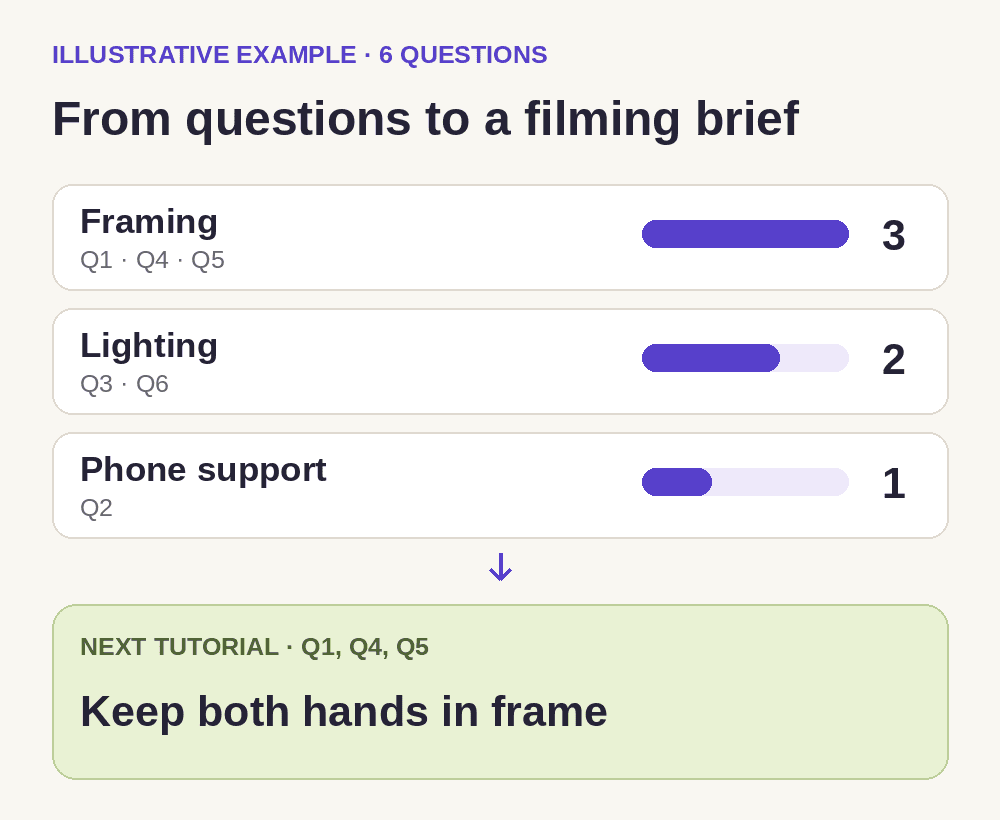
The table shows our proposed classifications for a fictional file. It contains six question records: three about framing, two about lighting and one about phone support. These numbers demonstrate the counting method. They do not estimate what an actual audience wants.
| ID | Question | Main topic |
|---|---|---|
| Q1 | Where should I place the phone for a desk demo? | Framing |
| Q2 | How can I hold the phone without a tripod? | Phone support |
| Q3 | Why am I dark when the window is behind me? | Lighting |
| Q4 | How do I keep my hands from leaving the shot? | Framing |
| Q5 | What angle works for an overhead desk shot? | Framing |
| Q6 | Where should I put a lamp for an evening recording? | Lighting |
Choose a demonstration you can make
After correcting the labels, ask for counts and the supporting row IDs. Where ChatGPT uses Python, review the code and its assumptions. For this small example, you can check the totals directly against the table. A polished chart cannot fix a bad assignment.
Framing is the largest group here. A useful next video could show the phone position, a marked working area and a hand movement that stays inside the picture. “Keep both hands in frame during a desk demo” is a narrower brief than “Make better videos.” Choose another topic if you cannot demonstrate that setup clearly or have already answered it well. Frequency helps prioritize a question; it does not guarantee views.
Save the evidence with the brief
Keep the original CSV, your corrected labels and the chosen brief together. Record which questions the video should answer. That makes a later revision possible without relying on a chat summary or an unexplained percentage.
Before filming, read Q1, Q4 and Q5 again and check that the planned shots answer them. After publishing, look for questions the demonstration still leaves open. Add those to a new batch with its own date. A small, self-selected collection is useful for deciding what to explain next, but it cannot establish the preferences of everyone who follows you.