Tools
Review a YouTube auto-dub before publishing your tutorial
Check measurements, negative instructions and what the picture shows before approving translated audio. A practical review workflow with a fictional craft example.
Choose a tutorial whose instructions you can check
A translated voice can sound smooth while giving the viewer a different instruction. In a craft tutorial, losing the word “not” changes which part of the paper gets cut. Before releasing a language track, check whether someone following it would perform the same actions as someone listening to the original.
YouTube creates translated audio tracks through automatic dubbing; availability varies. Start with a short tutorial you own, with one clear speaker and a demonstration you understand. Pick one target language for which you can arrange a competent review. This article proposes a review process; the paper example below is invented practice material.
Require review before publication
Check the video’s original-language setting. With automatic dubbing enabled, use Studio’s Settings → Channel → Advanced settings to require manual review before publication, then save. The source language should describe the speech you recorded, not the audience you want to reach.
Prepare a reference for the reviewer: the original recording, the intended meaning of difficult lines and the relevant timestamps. Ask someone who understands both the target language and the subject. If you cannot arrange that review, keep the language track unpublished for now. A fluent-sounding voice is not enough evidence to approve a translation you do not understand.
Write down the words that change the action
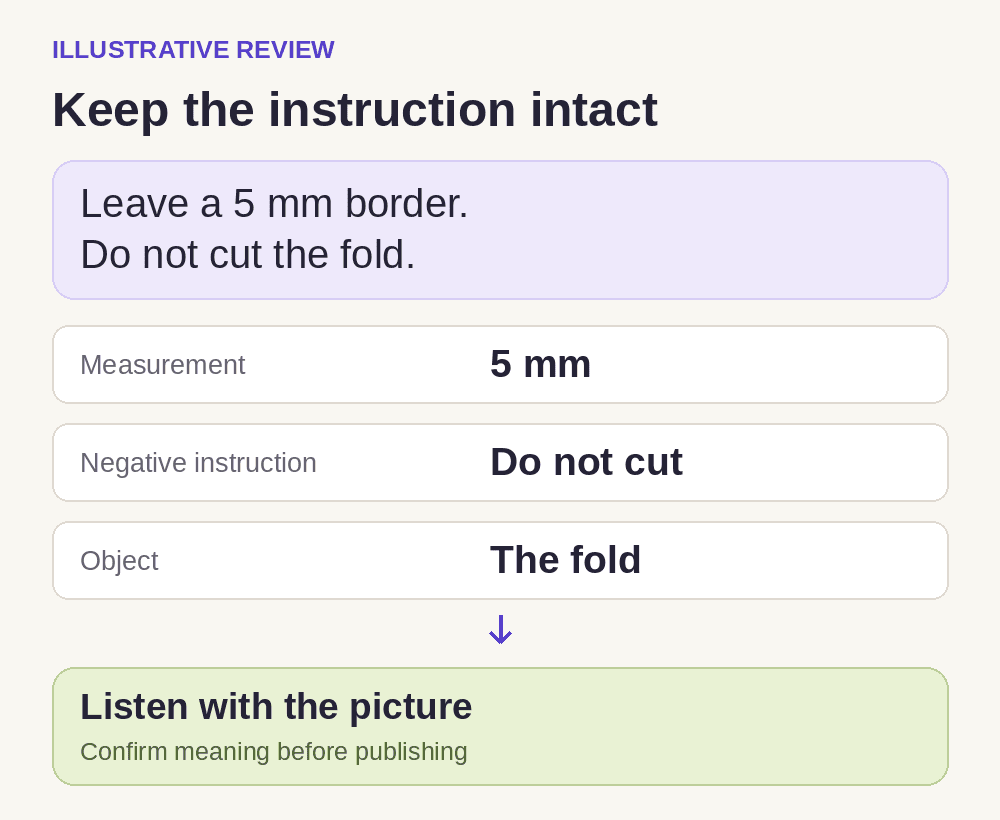
For the practice video, imagine the presenter saying: “Leave a 5 mm border. Do not cut the fold.” A useful review separates the measurement, the prohibition and the part being discussed. A general note such as “translation sounds good” leaves all three unchecked.
Mark these items in a small review sheet before listening. Add names or specialist terms when your own tutorial uses them. Give the reviewer the meaning you intend, without insisting on a literal word order; a natural translation can organize the sentence differently and still give exactly the same instruction.
| Check | Meaning to preserve | What to verify |
|---|---|---|
| Measurement | A border of 5 mm | Both the number and the unit are correct |
| Negative instruction | Do not cut | The prohibition remains audible and clear |
| Object | The fold in the paper | The wording refers to the folded edge being shown |
| Picture and timing | The edge the presenter points to | The instruction is understandable during that demonstration |
Listen while watching the action
In desktop Studio, open the video’s Languages page to preview a track. Start at the marked lines, then listen through the full tutorial. Check each language separately.
Ask the reviewer to explain what they would do after hearing the instruction, before showing them your preferred translation. If they describe cutting the fold, stop and identify the line that produced that interpretation. This is a suggested comprehension check, not a claim that YouTube made that error.
Watch the pointing gesture as well as listening. A correct phrase can be hard to follow if the scene has already moved to another part of the project. Note the timestamp and explain the mismatch. Check the surrounding sentence before deciding that a different phrasing is wrong; pronouns and short instructions often depend on what came immediately before them.
A translation back into your own language can help you find a line worth examining, but it should not be the only review. It cannot establish how the spoken track sounds to the intended viewer. Ask for a clear decision on each marked item and a note for anything still uncertain.
Approve each language on its own evidence
Automatic dubs cannot be edited; you can unpublish an inaccurate track. Approve a track only when its instructions and the complete viewing check pass. Record the language, review date and unresolved notes beside your working files so the decision can be revisited.
If you prepare your own recorded replacement, YouTube’s multi-language audio procedure requires removing the existing automatic dub for that language first. Have the reviewed replacement ready and retain your local files before doing this.
Keep the reviewer’s marked timestamps. If a viewer later reports an unclear instruction, return to that passage and compare it with the demonstration. Decide what needs correction before making the language track available again.