Tools
Clean up a phone voice-over with Adobe Podcast
Keep the original, enhance a copy and compare the words before replacing your voice track. A practical workflow for short creator videos.
Start with the sentence that matters most
A phone recording can contain a useful explanation and an annoying fan in the background. Before recording the whole thing again, try cleaning a copy of the voice track. Adobe Podcast’s Enhance Speech is a browser tool for reducing noise and echo in spoken recordings. The useful question is whether its output makes your particular take easier to understand.
Choose a sentence containing something the viewer must hear correctly: a product name, a price, a measurement or the next step. Include a pause and a quiet word if the take has them. This gives you a more demanding comparison than listening only to the loudest, clearest line.
Save the original before uploading
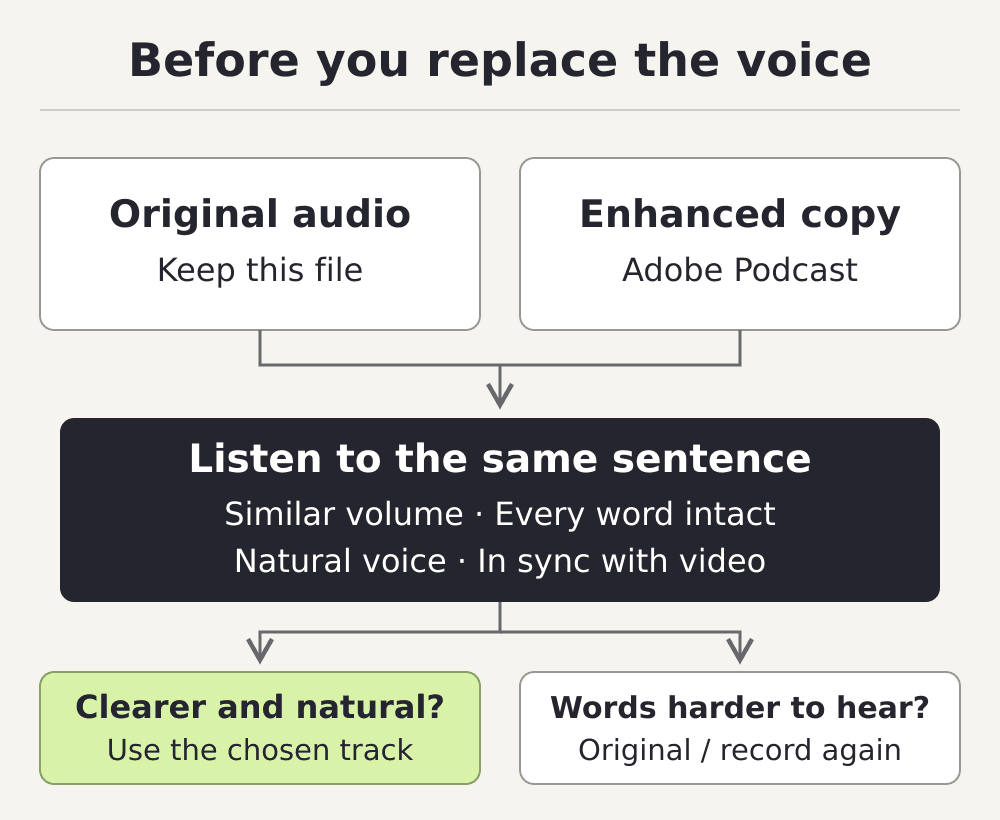
Keep an untouched copy of the recording. If the voice is already in a video project, export the voice track without background music, using the same start and end points you will use when replacing it. Choose audio you own or have permission to process.
Adobe lists WAV, MP3 and M4A among the accepted audio formats. Upload your short test to Enhance Speech, let it process, then download the result under a different filename. Check Adobe’s current plan limits before sending a longer take. For this walkthrough, you only need to work with an audio file.
Compare the same sentence at similar volume
Put the original and the downloaded file into your usual editor. Play one at a time, switching between the same short passage. Adjust playback levels until neither version sounds obviously louder. Otherwise, a volume change can distract you from what happened to the words.
First listen for meaning. Can you still hear the end of each word? Are the name, number and instruction unchanged? Then listen for the speaker: breaths, emphasis and the texture of the voice. Finally, listen to the gaps between sentences. A quieter background is useful only if you also like what happened to the speech.
Adobe’s FAQ says results depend on how audible the speaker is and how much background noise is present. Treat a difficult recording as a test, not as a guaranteed rescue. If an important word becomes harder to recognize, keep the original or record that line again. Do not judge the result from a quieter pause alone.
| Listen for | What to check | If it fails |
|---|---|---|
| Names and numbers | Every syllable carries the same meaning | Keep the original or re-record the line |
| Quiet endings | The last word remains complete | Try another take rather than guessing |
| Voice and pauses | The speaker still sounds natural | Choose the version you would publish |
| Background sound | Less distraction without losing useful context | Keep ambience on a separate track when needed |
Check it against the picture
If the short test passes, process the full voice track from the original and listen through that result too. Place the chosen track at the same starting point as the original. Mute the other version so you hear one voice, then watch the first and last spoken lines. Check visible mouth movements, gestures and cuts that depend on a word. If anything has shifted, fix the alignment before adding music back.
Now set the voice against the music and any background sound you want to keep. A cooking demonstration, for instance, may need the sound of a pan as well as narration; keep that sound separately when building the edit. Listen once on headphones and once through a phone speaker. Export the video and play that exported file, including its last sentence.
Leave a clear file trail
Save the original, the processed copy and the finished video together. Add a short note naming the version used and any line you replaced. That makes a later revision much easier than trying to remember which audio file sounded better.
For the next recording, repeat the comparison on one short passage before processing the full take. Keep the enhanced version when it improves intelligibility and survives the video check. If the original wins, use it.