How to Set Up Instagram Auto Reply to Comments and DMs
Set up an Instagram auto reply for comments and DMs on a Business or Creator account. Start with native saved replies, then add a keyword trigger for lead capture.
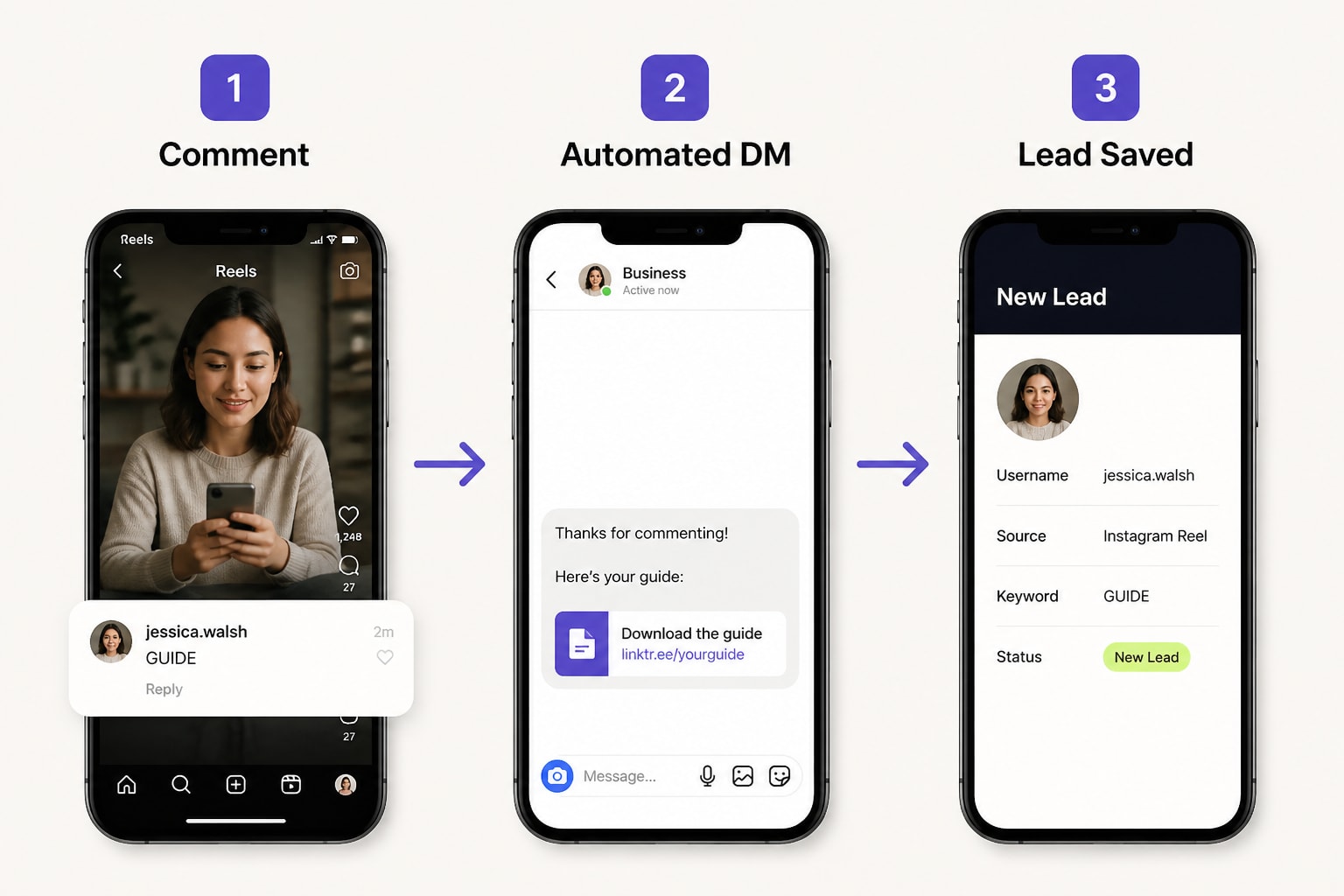
If you want an Instagram auto responder that handles both inbox questions and public comments, there are two main paths. Instagram's built-in tools cover saved replies, away messages, greetings, and FAQs. A keyword trigger can send a private DM when someone comments a chosen word on your post or Reel. The first path is best for inbox help. The second turns public comments into a private conversation.
This guide walks through both setups in the order most people should use them.
What you need before you start
Auto replies only work on professional accounts, so check these items first:
- An Instagram Business or Creator account. Personal accounts can't use these features.
- A connected Facebook Page, if the tool you choose requires one.
- A clear offer or answer, such as a guide, price list, or booking link.
- Five to ten minutes to write your reply copy before you build anything.
If you're still on a personal account, switch it to Creator or Business in Settings first. The rest of the guide assumes you have done that.
Step 1: Decide what your auto reply should do
Start with one job for your Instagram auto reply. If you try to do everything at once, the setup gets messy and people ignore it. Most creators and small businesses need one of these:
- Deliver a resource when someone comments a keyword, like a free checklist or waitlist link.
- Answer common questions in DMs, like pricing, hours, or shipping.
- Greet and filter new conversations when you can't reply right away.
Pick the one that saves you the most time today. If people keep asking for the same link under every Reel, start with the comment trigger. If your inbox keeps filling with the same three questions, start with saved replies.
You can add the others later. One working automation beats three half-built ones.
Step 2: Set up Instagram's built-in DM replies
Instagram's native tools work like a simple autoresponder for Instagram inbox messages, and you can switch them on in a few minutes. Open your profile, tap the menu, and go to Settings and activity. Find the messaging settings, then look for the options below. Exact labels change as Instagram updates the app, so check your own menu.
- Saved replies: Type a shortcut like price and a full answer. In any DM, type the shortcut and your saved text appears. This is manual, but fast.
- Away message: An automatic Instagram message sent when you are not available. Good for weekends and holidays.
- Greeting: An automatic Instagram message that new people see when they open a chat with you for the first time.
- FAQs and suggested questions: Tappable questions in your chat window. You write the answers once.
Instagram may also offer AI-generated replies for some accounts. If you see that option and do not want it, turn it off in the same messaging settings.
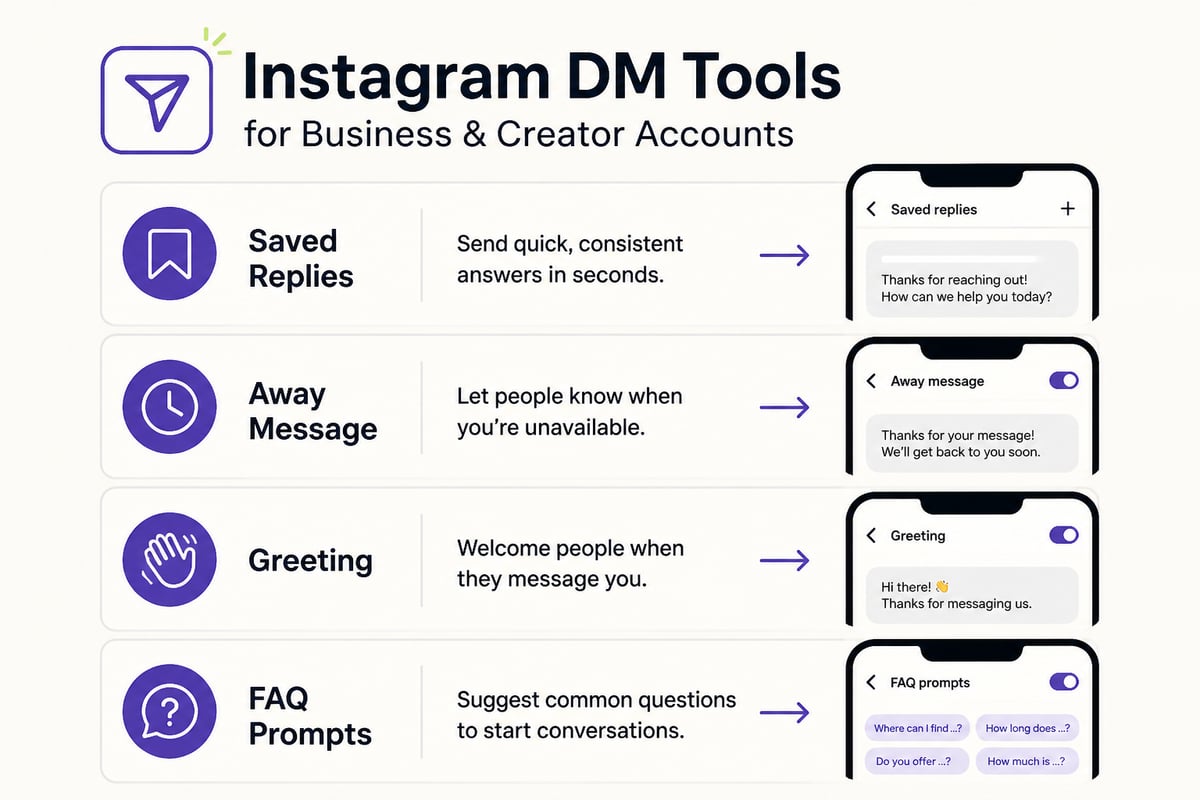
These tools help with DM support, but none of them reacts to a public comment. Someone who comments send me the link still waits for you to notice. That is where Step 3 comes in.
Step 3: Automate comment replies with a keyword trigger
You can automate comment replies on Instagram by choosing a keyword and using a connected tool that responds when someone types it. In practice, you tell your audience, comment GUIDE and I'll send it, and the tool sees the comment, then sends that person a private DM with your link.
That is the automatic DM Instagram setup most creators want. It is usually more useful than an Instagram auto comment or automated comments on Instagram, because the reply stays private and the public post stays clean.
Sayw is built for that flow. It is a no-code workspace for Instagram Creator and Business accounts that sends a link by DM when someone comments your keyword. If you want to see the setup, check the Instagram comment automation page and the Instagram comment automation page.
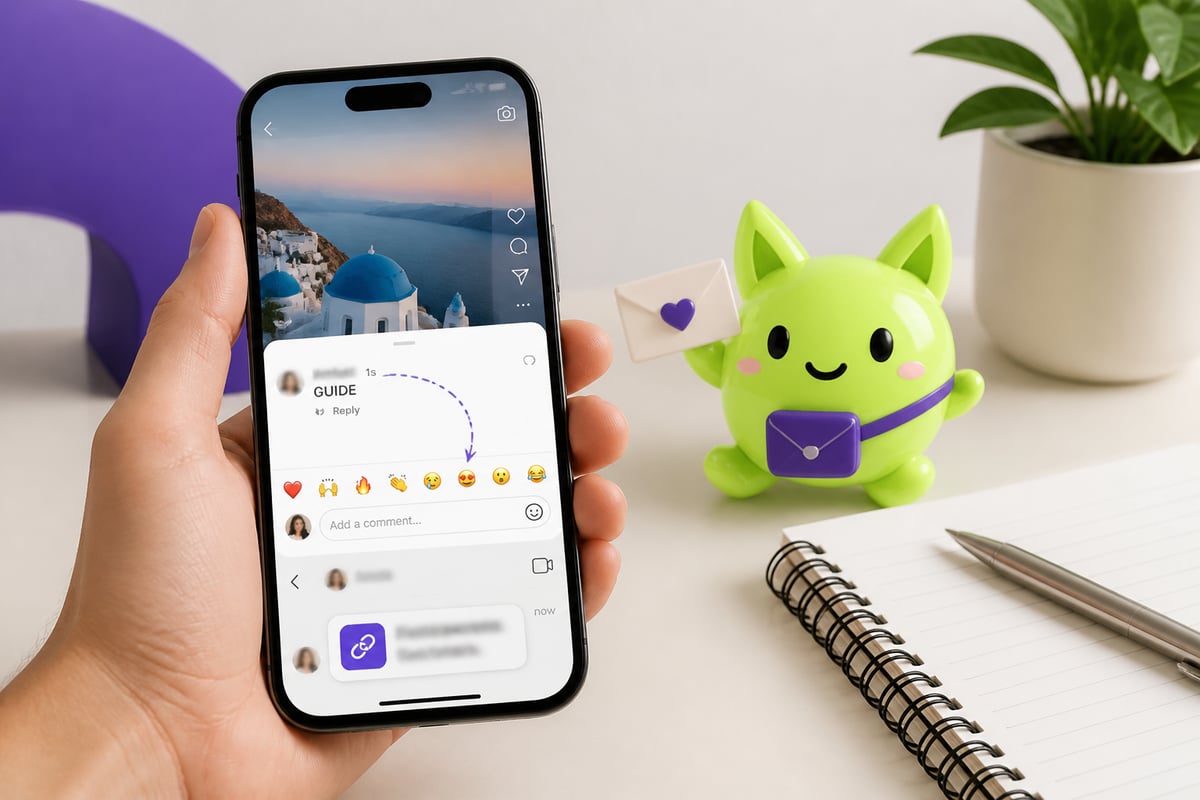
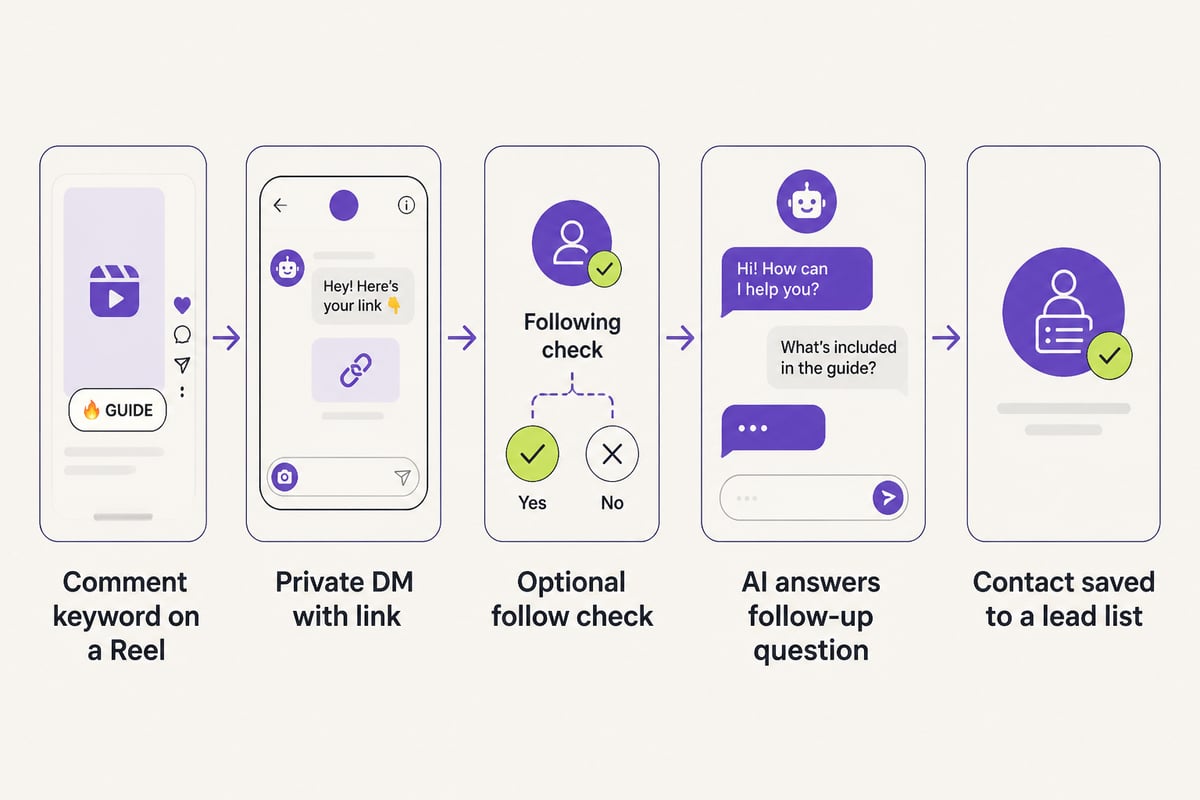
If you want an auto reply DM Instagram workflow that also tracks who asked, Sayw Instagram Comment-to-DM Automation adds optional follow checks, AI replies, and a built-in lead CRM. Read the product pages for the exact details instead of guessing from other tools.
Other platforms offer similar keyword flows, including Jotform's Instagram auto reply and ReplyRush. Compare what each one connects to and how it handles your account before you commit.
Step 4: Choose your keyword and write the reply
A good keyword is short, easy to type on a phone, and unlikely to appear in normal comments. Your reply copy matters just as much, because it is the first private message that person gets from you.
Keyword rules that work:
- One word, no spaces or punctuation
- Unusual enough that casual comments do not trigger it
- Printed in your caption, on screen in your Reel, and spoken in the video
- Different for each resource, so you know which post drove which lead
Reply copy rules that work:
- Say hi and name what they asked for
- Put the link in the first or second line
- Add one sentence about what happens next
- Keep it under a few short lines
A simple example: Hey, here's the free caption checklist you asked for: [link]. Reply here if you get stuck and I'll point you in the right direction.
For more wording ideas, the comment CTA examples post shows how to phrase the prompt on the post itself.
Step 5: Decide whether to require a follow first
Requiring a follow before sending your resource is optional. Choose it on purpose, not by default. Some creators like it because it turns a one-off commenter into a follower. Others skip it because it adds friction and can frustrate people who only wanted the link.
A simple rule of thumb:
- Free, low-effort resource: skip the follow gate and keep it easy
- Valuable guide or template you spent days on: a follow check is reasonable
- Paid offer or waitlist: skip it, since you want every interested person to see the link
In Sayw, you choose whether a follow is required before the resource is sent, so you can run different rules on different posts. If you use a follow check, tell people in your caption so nobody feels tricked.
Step 6: Add AI replies for follow-up questions
Once the link goes out, people often reply with a question. That is where AI can save you the most time. The goal is to answer routine questions quickly and hand anything unusual to you.
In Sayw, AI can answer follow-up questions using the information and FAQs you provide, so the answers come from material you wrote. Before you switch it on, gather the basics in one place:
- What the product or course includes
- Who it is for and who it is not for
- Your pricing and refund policy
- How people get started or book a call
Keep a clear path to a human for anything the AI should not answer. The human handoff guide covers when to step in yourself, and the price and FAQ file guide shows how to organize the source material.
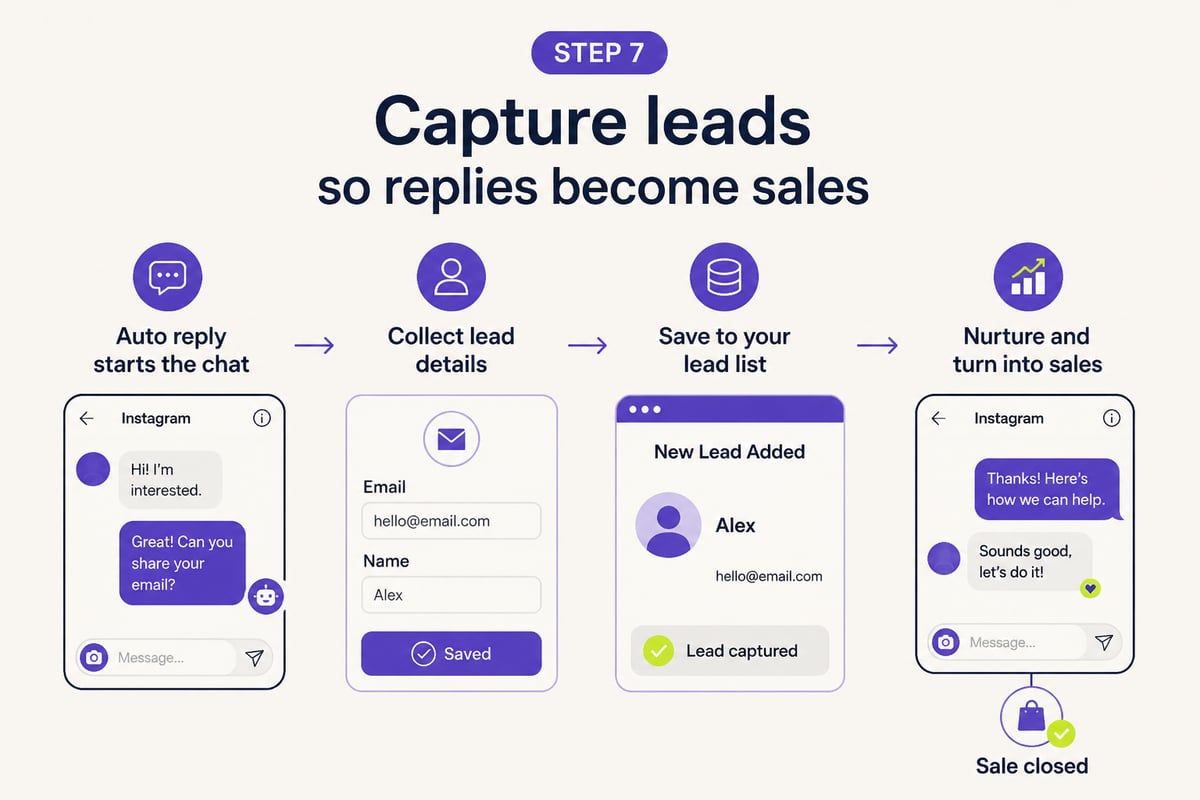
Step 7: Capture leads so replies become sales
Sending a link is only half the job. The other half is knowing who asked so you can follow up. Without a record, every comment-to-DM conversation disappears into your inbox.
This is the part most auto reply setups skip. A simple lead list should show who commented, which keyword they used, which post it came from, and what you sent them. With that, you can see which Reel actually produces interested buyers instead of guessing from likes.
Sayw includes a built-in lead CRM for this. If you want ideas on what to do with the list, the Instagram CRM next steps post walks through follow-up, and the guide to measuring comment-to-DM results explains which numbers are worth tracking.
Step 8: Test it before you publish
Test your automation from a second account before it goes live. A broken link or a missed trigger costs you leads you will never know you lost. This takes five minutes.
- Comment your keyword from a different account, like a friend's or a spare one.
- Check that the DM arrives and the link opens.
- Reply with a question and confirm the follow-up works.
- Try a misspelling and a lowercase version to see how forgiving the trigger is.
- Confirm the lead appears in your list..
Do this on a draft post or a low-traffic one first. The comment checklist is a handy pre-publish reference.
How to turn off an Instagram auto response
To turn off an auto response on Instagram, go back to the setting where you turned it on and switch it off. For native features, that means the messaging area under Settings and activity: remove your away message, clear the greeting, or disable AI replies if that option appears for you.
For a keyword automation, pause or delete the trigger inside the tool you used. If the tool seems to have stopped working or you changed your password, you may need to reconnect your account. The safe reconnection guide shows how.
Common mistakes and troubleshooting
Most auto reply problems come from a few repeat causes, and each has a quick fix.
- The DM never arrives: Confirm the account is Business or Creator, the connection is active, and the commenter does not have DMs restricted. Some people simply cannot receive messages from accounts they do not follow.
- The keyword triggers by accident: Pick a rarer word. Common words like yes or info fire constantly.
- People comment but do not get anything: Your caption may name a different keyword than the one you set. Match them exactly.
- The reply sounds robotic: Rewrite it the way you would text a friend. Use their name if your tool supports it.
- Too many questions land with you anyway: Add the missing answers to your FAQ file so the AI has something to work from.
- Followers feel tricked by a follow gate: Say it plainly in the caption before they comment.
- No idea which posts work: Use a different keyword per post so your lead list shows the source.
Avoid sending bulk auto DMs Instagram users never asked for. Replies that respond to something a person actually did feel helpful, while unwanted messages feel like spam.
FAQ
Can you set an automatic reply on Instagram?
Yes. On a Business or Creator account, you can set an away message, a greeting, and saved replies in your messaging settings. For automatic replies to comments, you need a connected tool that watches for a keyword and sends a DM.
Is there a way to auto send a message on Instagram?
Yes, but only in response to something a person did, like commenting a keyword or starting a chat. Instagram's own tools and connected apps built on official account connections can do this. Sending unprompted messages to people who have not interacted with you is not supported.
Do I need a Business account for an Instagram auto reply?
You need a Business or Creator account. Personal accounts do not have access to these messaging features or to comment-triggered automation. Switching is free and takes a minute in your settings.
Pick one resource you already give away, choose a single keyword for it, and write the DM reply before you open any tool. When you are ready to build it, Sayw lets you turn that keyword into a private DM with a link, optional follow checks, and a lead list in one place, using Sayw Instagram Comment-to-DM Automation. You can start free and test it on one Reel before rolling it out to the rest of your posts.
Article written using RankPill.
Q&A
Question: What is the main difference between Instagram's built-in auto replies and a keyword-triggered comment automation?
Short answer: Instagram's built-in tools are mainly for DM management, such as saved replies, greetings, away messages, and FAQs. They help you answer or guide people once they are already in your inbox. A keyword-triggered comment automation replies when someone uses a specific word in a post or Reel. It then sends them a private DM with your link or resource.
Question: What should I set up first if I am new to Instagram auto replies?
Short answer: Start with the automation that solves your biggest current problem. If you spend time manually answering the same DM questions, create saved replies, FAQs, or an away message first. If people often comment link please or ask for a resource under your posts, start with a keyword trigger that sends the link by DM.
Question: Why is using a different keyword for each post useful?
Short answer: Different keywords make it easier to track which post or Reel generated each lead. If every post uses the same keyword, you will know people wanted a link. However, you won't know which content got the most interest. Unique keywords connect comments, DMs, and leads back to the original post.
Question: Should I require people to follow me before they receive the link?
Short answer: It depends on the value of the resource and how much friction you want to add. The guide recommends skipping the follow gate for free and easy resources. You can also skip it for paid offers or waitlists. However, consider using it for valuable guides or templates. If you do require a follow, say so clearly in the caption before people comment.
Question: What should I test before publishing an Instagram comment-to-DM automation?
Short answer: Test the flow from a second account before sending traffic to it. Comment on the keyword. Confirm that the DM arrives. Open the link. Reply with a follow-up question. Try using lowercase or misspelled versions. Make sure the lead is in your list. This helps catch broken links, mismatched keywords, and missed triggers before they cost you leads.